Qual é a sua dúvida sobre Neuroshima Hex! Dancer?
Pergunte antes de baixar o manual: o assistente foi treinado neste arquivo e responde na hora, citando a página exata.
Tire dúvidas sobre o jogo
Pergunte qualquer coisa sobre Neuroshima Hex! Dancer: regras, preparação, componentes, complexidade, preço ou se combina com seu grupo.
Escreva sua pergunta primeiro. Você criará sua conta grátis para ver a resposta — leva 20 segundos.
Manual completo
Navegue pelo manual ou baixe o PDF originalTexto completo do manual disponível para leitura Abrir texto
BACKGROUND
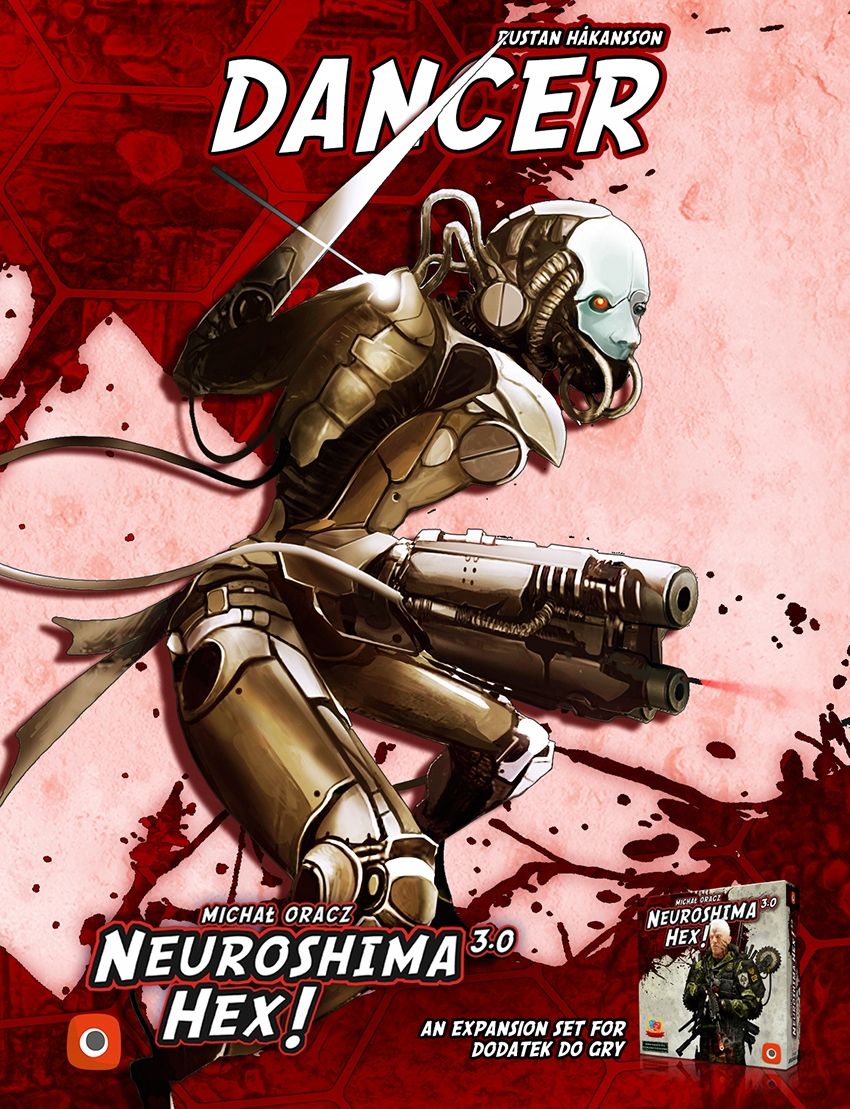
The Moloch attack on Outpost’s laboratories had unforeseen consequences: the damage to the facility set three strange creatures free. They are the product of a secret genetic research project, code name “Dancer”. Now, half-mad and with no control over their instincts, the creatures begin their fight for survival in the post-apocalyptic wasteland.
The Dancer is a completely new challenge for Neuroshima Hex players.
ARMY DESCRIPTION
The advantage of this army is the great Toughness of its units and Healing ability which restores 2 Toughness Points. In addition, Dancer is able to attack the enemy apart from Battles and inflict massive damage.
The weaker point is the fact that it has only 3 units and should even one of them be killed, the Dancer loses.
TACTICAL ADVICE
Above all, Dancer Objects show their strength in the offensive. It’s good to place all 3 Object tiles in the middle of the board, so that the distance to the enemy’s HQ would be the shortest possible, regardless of where the opponent’s HQ is placed.
During the game, while moving Dancer Objects on the board, try to always combine them in a stronger configuration, so they can support each other with their Module features.
GAME SEQUENCE
Dancer has only 3 Board Tiles which serve simultaneously as the army’s HQ, Units, and Modules. These tiles will be called Objects. Dancer has no other Board Tiles – neither Soldiers, nor Modules.
Each Dancer Object starts with 10 Toughness Points. Damages absorbed by each Object count separately – each Object has its own damage token which should be placed on the Damage track on the space marked 10. If Toughness points of any Object are reduced to 0, the Object is destroyed and Dancer loses the game.
The player commanding the Dancer is always the starting player. He places all 3 Object tiles anywhere on the board (they may be adjacent to each other). The opposing player (or players in multiplayer mode) subsequently places his (their) HQ. The rest of the game continues as normal, meaning the starting player (Dancer Player) draws one tile from his pile and may use it, save it for later or simply discard it. Then the other player (Player Two) draws two tiles and so on.
14
Our games are assembled with the greatest care. However, if your copy lacks anything - we apologize for it.
Please let us know:
portal@portalgames.pl
IMPORTANT!
Visit our website
www.portalgames.pl
for a set of completely new
Hex Puzzles with DANCER. Author: Rustan Håkansson
Development: Michał Oracz Rulebook: Łukasz Piechaczek Rulebook: Łukasz Piechaczek,
Danai Chondrokouki Illustration: Mateusz Bielski, Andrzej Wysocki Design & Layout: Maciej Mutwil
Credits and Thanks: MichallusTG, Midaga, Robert Ciombor, Michał Ciombor, Marek Glegoła, Mateusz Ilków, Daniel
Oklesiński, Jakub Król, Maciej Matuszewski, Maciej Mutwil, Rafał Szyma, Marcin Karbowski, Hubert Bartos, Walec, Młody,
Neurocide, Arti, Zachi, Giles Pritchard.
www.portalgames.pl
Portal Games Sp. z o.o.
ul. Św. Urbana 15
44-100 Gliwice, Poland
tel./fax. +48 32 334 85 38
portal@portalgames.pl
www.portalgames.pl
Box contents:
35 Dancer army tiles,
3 Dancer HQ markers, 7 Wound markers,
2 Net markers, a replacement tile,
rulebook.
More armies to come!
You can skip reading the rules and watch our video tutorial!
www.portalgames.pl
Terror (Smart, Steel Police) - as the Dancer has no Board Tiles, Terror prevents the Dancer from performing Dance and playing Action tiles in the next turn.
Scoper (Outpost) - works normally against Dancer, so as long it is connected to the Object, that Object’s Module feature gives bonus to Outpost units instead of other Objects. It also blocks the ability of Healing, although the Outpost is not able to use it.
Spy ability (New York) - works normally, so a unit with this ability can receive a bonus from Object’s Module feature, with the exception of Healing that requires activation with Action tile.
Executioner (Steel Police) - his ability does not work against Dancer, it’s just an ordinary Soldier.
Sharrash Mississippi Mephisto New York Smart Vegas
---
X
X - liczba żetonów
1
Toughness: 10
Action: Melee Attack in one of 5 possible
directions
Module feature: Officer (increases the
strength of ranged attack, works in one
direction)
OBJECT BLUE
1
Toughness: 10 Action: Ranged Attack in one of
5 possible directions
Module feature: Officer (increases the
strength of melee attack, works in one
direction)
OBJECT RED
32
Destruction of an Object during a Battle is resolved the same way as destroying a HQ, so the Battle goes on as usual (destroyed Object remains on the board until the end of the Initiative phase it was destroyed in and is moved to the discard pile after all actions in this phase have been carried out). If the opponent’s HQ is destroyed as well, the game finishes with a draw.
If none of the Objects is destroyed and the Final Battle has been fought, the Dancer player should sum up remaining Toughness points of all Objects and compare the result with remaining Toughness points of the opponent’s HQ. The player who has more Toughness points left is the winner. If both players have the same number of points remaining, the game ends with a draw.
ADDITIONAL RULES
Healing
Object Yellow has the Healing ability. It works in the direction indicated. If another Object is connected to this
side, it is also healable. Object Yellow can Heal itself.
Healing restores 2 Toughness Points of the healed Dancer Object, but the Toughness of any Object cannot rise
above 10.
Healing is activated only by playing an Action tile. If
Object Yellow is disabled by a Net (or is Controlled by Vegas), it can’t use Healing because you can’t play an Action
tile on an Object disabled by a Net or Controlled.
If another Object is disabled by a Net (or Control has
taken over it), it also can’t be Healed.
Note for the multiplayer game
In a team match for 4 players, Healing can also be
used to restore Toughness Points of an allied HQ, but
the strength of healed HQ cannot rise above 20.
Dance
At the beginning of his turn, after drawing tiles, Dancer
player may discard all his tiles (even if he has less
than 3), and instead of playing any, he can perform
the Dance – switch places and /or rotate any or all
Objects. This means that the player can, for example:
• switch places of all the Objects (and rotate them);
• switch places of the two selected Objects (and rotate them), and - if he wants – rotate the third one;
• do not switch places of the Objects but just rotate
any or all Objects.
Release
The Net usually disables Dancer Objects, with the fol-
lowing exception: Object disabled by a Net can still
perform the Dance, and you can also move it away
from Net by playing a Move tile (you can’t play an
Action tile on a disabled Object).
In both cases the Object that was disabled by a Net,
receives one wound for every Net it was under, for
example, if all three Objects were disabled by Nets and
the player – performing the Dance – switched places
of two Objects, doing nothing with the third one, only
these two Objects receive damage.
The same rule applies to Net of steel (from Steel Po-
lice) - performing the Dance or playing a Move tile,
the netted Object can be set free and the Net of steel
returns to Steel Police HQ.
This rule applies the same way to Control Takeover
by Vegas.
Release works also in another way. Using a Move tile,
Castling tile or a Rotation tile (Vegas can use the Ro-
tation tile), an enemy’s HQ may also be set free from
the Dancer’s Net, receiving one wound. Such damage
is normally absorbed by a Medic if it was connected
to the releasing HQ while it was disabled by a Net, so
before it made a Move which set it free.
Note for the multiplayer game
If the Dancer Object is disabled by a Net and under
Control of Vegas, then performing a Dance or using
a Move tile, this Object will receive one wound for each
Net and Control Takeover.
In a multiplayer game for points when the Dancer Ob-
ject would be disabled by Nets of a few players (or
Net and Control Takeover) and Player would move this
Object using a Move tile or Dance, each opponent re-
ceives as many points as his Nets (or Control) were
disabling the Object.
Special Rules
Dancer Objects are both Soldiers and HQs, so in a game
against Dancer you should consider the following chan-
ges to the effects of some tiles or abilities.
Instant Action tiles or effects that do not inflict wounds
to HQs but only to Soldiers and Modules (Grenade, Sni-
per, Air strike, Small bomb, Mine), inflict one wound to
Dancer Object on which they have been used.
Vegas Takes Control over the Dancer Objects in the
normal way - at the time of taking Control it can turn
the Object being taken over and it will be treated as a
unit of Vegas, so during the Battle it deals damage to
other Objects and receives damage from them, while it
doesn’t receive damage from Vegas units.
1
Toughness: 10
Action:
- Ranged Attack (only in one direction)
- Special Module activation (Healing)
Module feature: Scout (increases Initia-
tive value of connected Object, works in
two directions)
Special Module feature: Healing
OBJECT YELLOW
Module features work all the time and in the same way as normal
Modules. The only difference in Special Module feature (Healing)
is that it is activated with Action tile.
Dancer Objects inflict damage to other HQs and receive dama-
ge from opponents’ HQs (and also from its own attack if reflec-
ted by Judge from Steel Police).
Note for the multiplayer game
In a team match the Dancer Objects are not affected by Modu-
les and HQ bonuses from the allied army, while allied units are
normally affected by Objects’ Module features.
8
A Battle begins. After
Battle, the player’s turn ends. Not useable if any player drew their last tile.
BATTLE 10
Move a unit to an adjacent, unoccupied hex and/or turn it in any direction desired.
MOVE 7
Push an adjacent enemy unit 1 hex away to an unoccupied hex. If there’s a choice, enemy player selects the hex.
PUSH BACK
Example of Action tile usage
In the presented situation, the player can use an Action tile in several ways:
1. He can use it on Object Yellow to activate Healing and restore 2 Toughness Points of Object Blue or Object Yellow itself,
2. He can use the Action on Object Blue to perform a melee attack to inflict 3 points of dama-ge upon the Outpost HQ (strength of the attack is enhanced by Object Red’s Module feature),
3. He can use the Action on Object Red to shoot at Commando or Brawler.
7
Using this tile lets you choose one of the Dancer Objects and immediately activate one edge of this Object tile to perform an attack from this edge (melee attack, ranged attack).
Action tile is also used to activate Object Yellow’s
Special Module feature – Healing.
If the attack triggered with an Action tile is performed
by an Object, whose attack strength is increased by
another Object’s Module feature, then the attack has
increased strength.
During one turn, you can play only one Action tile on
one Object. This means that if you have 2 Action tiles
in your hand, you can use one Action to activate a
chosen edge of any Object and if you want to use the
second Action, then you have to activate an edge of
another Object.
An Action can’t be played on an Object that is disabled
by a Net (or which is Controlled by Vegas).
ACTION
also used to activate Object Yellow s Special Module feature Healing If the attack triggered with an Action tile is performed by an Object whose attack strength is increased by another Object s Module feature then the attack has increased strength During one turn you can play only one Action tile on one Object This means that if you have 2 Action tiles in your hand you can use one Action to activate a chosen edge of any Object and if you want to use the second Action then you have to activate an edge of another Object An Action can t be played on an Object that is disabled by a Net or which is Controlled by Vegas ACTION
---
Por que perguntar ao BoardGamesBot
Em vez de folhear o manual inteiro- Respostas precisas Baseadas exatamente neste manual, com a página de origem.
- Economize tempo Ache a regra em segundos, sem folhear 2 páginas.
- A qualquer hora Tire dúvidas no meio da partida, direto do celular.
- 100% grátis Crie sua conta grátis e comece a usar agora.
Como funciona
Três passos até a resposta- 1 Faça sua pergunta Digite sua dúvida sobre as regras deste jogo.
- 2 Crie sua conta grátis Leva 20 segundos — é só para guardar seu histórico.
- 3 Receba a resposta A IA encontra a regra exata e cita a página do manual.
Expansão de
Conteúdo adicional publicado
Manual publicado pela editora · uso para consulta de regras. Mais sobre o jogo em BoardGameGeek e Ludopedia .