How to Play Azul: Joker Tiles
Plan B Games, Ghenos Games, Lacerta · Board game · 2017
2–4 · best 2
30–45 min
Weight 1.7/5
8.2
rating
Ludopedia
7.3
rating
BGG
What do you want to do now
Ask questions about the game
Ask anything about Azul: Joker Tiles: rules, setup, components, complexity, price, or whether it fits your group.
Example questions
Continue this chat in the Assistant
Game page
Prices, ratings and our review
Rules manual
Official PDF file
Step by step
Game Objective
Refer to the manual for details on this section.
Preparation (Setup)
Game setup varies depending on the number of players:
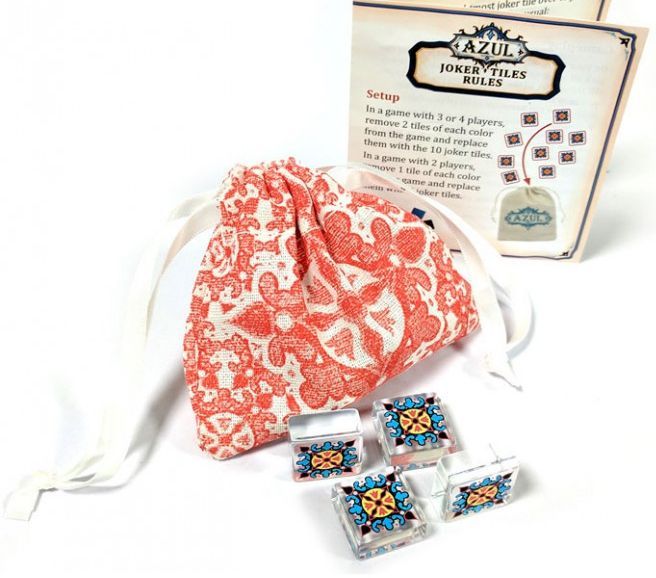
- In a 3 or 4 Player game, remove 2 Tiles of each color from the Game and include the 10 Joker Tiles.
- In a 2 Player game, remove 1 Tile of each color from the Game and include 5 Joker Tiles.
Gameplay Flow
Refer to the manual for details on this section.
Actions and How to Play
On your turn, during the Tile selection phase:
- You may choose all Joker Tiles from one location.
- If you choose all Joker Tiles, you may also choose all Tiles of another color from the same location (if possible).
- You must add all Tiles you chose to the same Row (placing any excess on the Floor Line).
- Any row can contain Tiles of a specific color and/or Joker Tiles.
In the Tiling phase:
- If you complete a row that has Joker Tiles, the order of your pieces must be rearranged so that the rightmost space is occupied by the Joker Tile.
- Then, move the Joker Tile to the corresponding Wall Line as usual:
- If your row only has Joker Tiles, place one of them in any free space on the corresponding wall line.
- If your row includes another color, place the Joker Tile in the space corresponding to that color on the wall line (Colored Board).
- Then score as usual.
Additional rules:
- If a Joker Tile occupies a space on the wall of a certain color, you CANNOT place more Tiles of that color in the Row.
- Any Row or Column of the wall can contain multiple Joker Tiles.
End of Game and Scoring
At the end of the Game, Joker Tiles DO NOT COUNT as the specific color, preventing the player from receiving the 10 additional points for 5 of a kind.
Refer to the manual for details on the end-game trigger and other scoring criteria.
Tips for Winning
Refer to the manual for details on this section.
Rules manual
Official PDF file
Prefer the Official PDF?
Download the official Azul: Joker Tiles rulebook or browse it online with our AI rules assistant.
View Rulebook PDF
Frequently Asked Questions
Quick answers about the rules
What is the objective of Azul: Joker Tiles?
Refer to the manual for details on this section.
How do you set up Azul: Joker Tiles?
Game setup varies depending on the number of players: In a 3 or 4 Player game, remove 2 Tiles of each color from the Game and include the 10 Joker Tiles. In a 2 Player game, remove 1 Tile of each color from the Game and include 5 Joker Tiles.
How do you play Azul: Joker Tiles?
On your turn, during the Tile selection phase: You may choose all Joker Tiles from one location. If you choose all Joker Tiles, you may also choose all Tiles of another color from the same location (if possible). You must add all Tiles you chose to the same Row (placing any excess on the Floor Line). Any row can contain Tiles of a specific color and/or Joker Tiles. In the Tiling phase: If you complete a row that has Joker Tiles, the order of your pieces must be rearranged so that the rightmost…
How does Azul: Joker Tiles end, and how do you score?
At the end of the Game, Joker Tiles DO NOT COUNT as the specific color, preventing the player from receiving the 10 additional points for 5 of a kind. Refer to the manual for details on the end-game trigger and other scoring criteria.
What are some tips for winning Azul: Joker Tiles?
Refer to the manual for details on this section.
Want to compare prices and check reviews?
Find where to buy at the lowest price, price history, and our full game review.
View Azul: Joker Tiles
Expansion for
Published additional content